Toolbox
Network Diagnostic Tools
Port Reachability, DNS, Whois, CIDR and HTTP Headers.
At a glance
These five tools live together in the Toolbox, and split into two groups. DNS Lookup and the CIDR Calculator run entirely from your browser and work anywhere the app does, and so does Whois — except for a registry that publishes no RDAP, which it asks through Kashic's server. The HTTP Header Inspector and Port Reachability ask Kashic's server to do what a web page can't — read a site's headers, or open a connection to a port — once you're signed in.
Every result here is live — a real lookup against a real service, not a canned example — so what you see will differ from the numbers on this page.
How to…
Every tool below opens the same way: press Alt+X, or click Toolbox in the Command Center, then click its tile. See The Toolbox for moving, resizing, and closing the tool window itself — the steps below pick up from there, one tool at a time.
Port Reachability
What it answers: does this port on this host accept a connection? Is Remote Desktop open to the internet, did the firewall change take effect, is the mail server listening?
How to run it: enter a Host / IP and a
Port, then click Check Port or press
Enter. The Common ports buttons — SSH, DNS, HTTP,
HTTPS, SMB, RDP and others — fill in the port. A pasted URL or
host:port works too: the port moves into its own field. At
kashic.ai you need to be signed in: signed out, the tool says "Sign in to
check a port" and offers the Sign in button rather than sending
anything.
Reading the result: one of four answers, with the address the name resolved to, how long the connection took, where it was checked from, and when.
- Open — something accepted the connection.
- Closed — the host, or a firewall in front of it, refused it. The host is reachable; nothing accepts connections on that port.
- No answer — nothing replied within 5 seconds. A firewall dropped the attempt, or the host is down; a connection alone can't tell which.
- Unreachable — a router reported that there is no route to the address.
Each check is listed under the result, newest first, for as long as the window stays open; nothing is kept after you close it.
Where it checks from: the connection comes from Kashic's server in Azure, so the answer is the internet's view — what an outside visitor would find. A check of your own public address from inside your network can get a different answer than this one.
Honest limits: the tool opens a TCP connection and sends nothing once it opens, so it can't check UDP services — DNS queries, most VPNs, VoIP media — and Open means something answered, not which service it is or whether it works. Only public hosts can be checked: private, loopback, link-local and other reserved addresses, and names that only exist on a local network, are refused with a sentence and nothing is sent. It checks one port at a time and isn't a port scanner; signed in, checks are limited per account and per host, and past a limit the tool says "Too many port checks — try again in 40 seconds." Port 25 can't be checked, because Azure blocks outgoing connections on it. A connection from Kashic's address to someone else's server can look like a probe, so every check is recorded with your account — the host, the port and the result — and kept for 90 days, so a report about one can be traced.
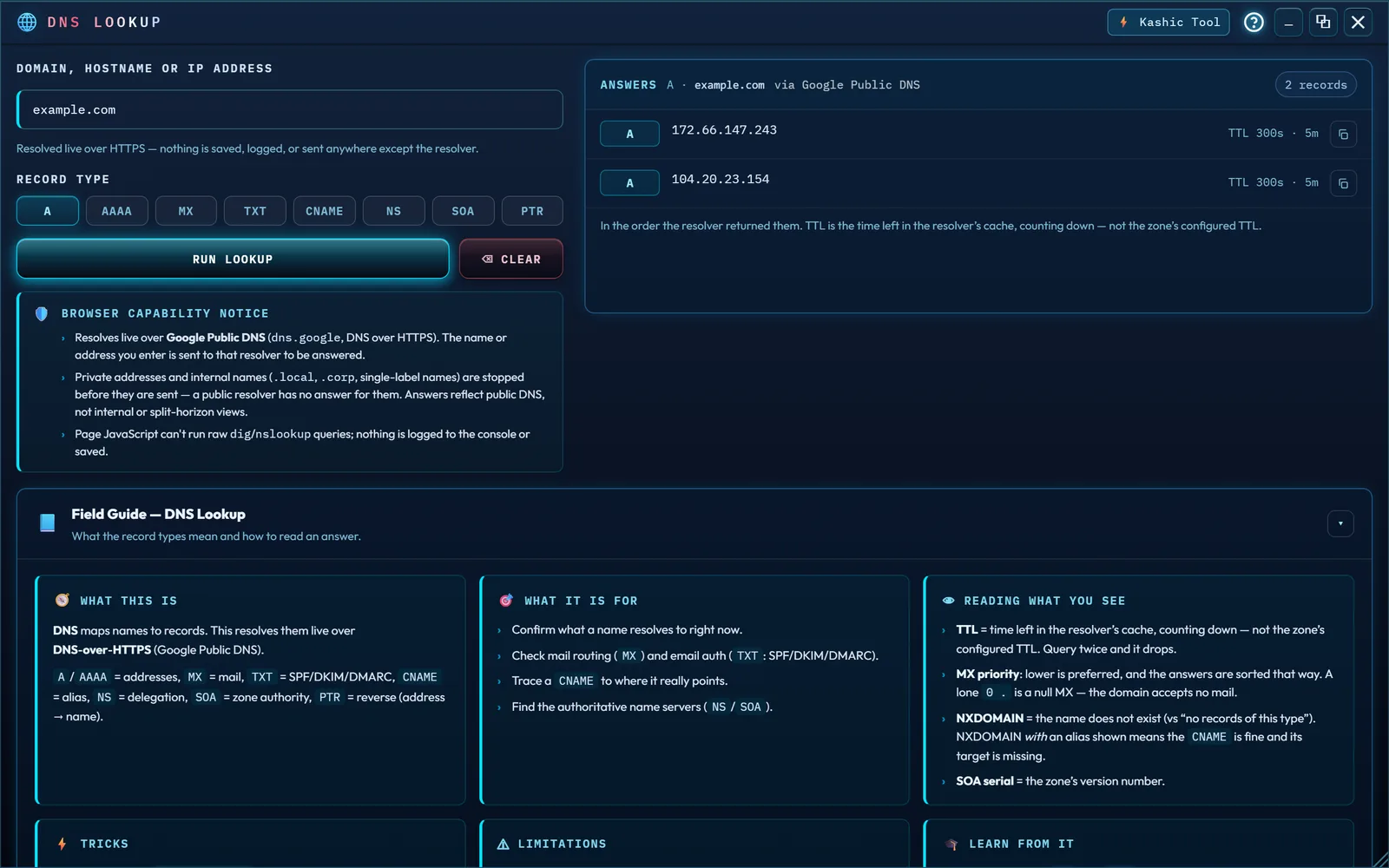
DNS Lookup
What it answers: what does this name currently resolve to, in real public DNS?
How to run it: enter a Domain, Hostname or IP
Address, choose a Record Type — A,
AAAA, MX, TXT, CNAME,
NS, SOA, or PTR — and click
Run Lookup. An IP address runs as a reverse lookup: the tool
asks for the address's PTR record by its reverse name
(8.8.8.8 is asked as 8.8.8.8.in-addr.arpa), lights
the PTR chip to show what ran, and goes back to the type you had
picked for the next name you enter.
Reading the result: an "Answers" header naming the record
type and host queried, tagged "via Google Public DNS," then one row per record
— its type, value, and TTL, in the order the resolver returned them, except
MX rows, which are sorted by priority, lowest first: the order
senders try them.
TTL is the time left in the resolver's cache, counting down
— not the zone's configured TTL, so querying twice a few seconds apart
shows a smaller number the second time. An MX row shows the mail
exchanger with its priority; TXT values are shown exactly as
published, byte for byte; SOA expands into its seven named
fields. When an answer spans more than one name — a CNAME
chain — each row also shows the name that hop belongs to, so the chain
reads in order. Every row has a copy button.
Answers that mean the opposite of what they look like: a
single MX of 0 . is an RFC 7505 null MX, and
the tool labels it "Accepts no mail" — the domain is publishing that it
receives no email at all, which is the opposite of a working mail route. An
NXDOMAIN that still returns an alias is reported as "Alias
resolves, target does not": the name you asked about is fine and the name it
points at is missing, so the fix belongs at the target. This is what a broken
DKIM selector or a stale CDN delegation looks like.
Honest limits: every lookup is real and live, resolved over
DNS-over-HTTPS against Google's public resolver
(dns.google) — not your organization's internal or split-horizon
view. Private addresses and internal names are never sent at all: an RFC 1918,
loopback or link-local address, a name ending in .local,
.corp or .internal, or a single-label name like
fileserver gets a "Not sent" panel saying why —
a public resolver has no answer for it, and asking would only disclose it. To
look up a top-level domain itself, end it with a dot (com.).
Two "nothing here" results look different on purpose. A name that plain
doesn't exist anywhere gives "Domain not found — NXDOMAIN",
reporting that it "does not exist in public DNS." An address with no reverse
name gives "No reverse record — NXDOMAIN", which is common
and only matters on a mail server. A name that resolves fine but just doesn't publish that
record type instead gives "No <TYPE> records" — asking
www.example.com for its NS records reports it
"resolves, but publishes no NS record," which is normal, not broken.
A resolver failure is never reported as either one: SERVFAIL,
REFUSED, NOTAUTH and any status the tool does not
recognize each get their own message, because a resolver that errored proved
nothing about whether the record exists, and a reply the tool can't read says
"Unreadable response" rather than guessing. Every outcome — including the
negative ones and the failures — names its source, so a claim never
appears without saying who made it.
Other behavior worth knowing: the window opens maximized,
and you can restore or resize it normally from there. The record-type chips are
a single-choice group: Tab reaches the row once, then the arrow keys move
between types and Home/End jump to the ends. Clearing resets the name, the
answer and any error, but deliberately keeps your chosen record type — unless
an IP address moved it to PTR, in which case it goes back to the
type you had picked. Lookups don't leave a copy behind: the request skips the
browser's cache and sends no referrer or cookies. A name
with non-ASCII characters is converted to its punycode (xn--) form
before the query, and the result says so. Very large answers are capped for
safety — at 200 records and at 4096 characters per record — and
whenever a cap applies the panel says exactly how much was returned, so what
you see is never quietly less than what came back.
Whois Lookup
What it answers: who is this domain registered through, and what are its key lifecycle dates? Or, for an IP address: whose network is it on, and where do I report abuse from it?
How to run it: enter a Domain or IP Address
and click Look Up or press Enter. A full host
name works too: www.example.com is looked up as the domain it
belongs to, and the result says so. So does a pasted URL, or a name with a
port such as example.com:8080.
Reading the result: a Registration card (registrar,
registered/updated/expiry dates, whether DNSSEC is signed, and the registrar's
abuse contact when the registry lists one), a Nameservers card, and a Status
card with the registry's lock and lifecycle codes. An expiry within 30 days is
marked, and so is one that has passed. Looking up example.com, for
example, shows its registrar as IANA, real dates, "Signed" DNSSEC, two
Cloudflare nameservers, and status codes such as client transfer
prohibited — a normal registrar lock, not a warning sign. The line
beside the domain names where the record came from, for example
"via rdap.verisign.com (RDAP)".
An IP address: type one such as 8.8.8.8 or
2001:4860:4860::8888 and Whois asks the regional registry that holds
it — ARIN, RIPE NCC, APNIC, LACNIC or AFRINIC — through rdap.org.
A pasted URL or an address with a port is read as its address, and
::ffff:8.8.8.8 as the IPv4 address it is. A block such as
8.8.8.0/24 shows the network that holds the whole block, which
can be larger than the block you typed.
The result shows the Network (its name, handle, address block, type and dates),
the Owner (the organization, the registered country and the abuse contact) and
its status. The registered country is where
the owner registered the block, not necessarily where the device is. A private
or other non-public address — 192.168.1.1, 127.0.0.1,
fe80::1 — is answered here and never sent: "10.0.0.1 is not a
public address — that is a private address (RFC 1918), so no public registry
holds it. Nothing left your browser." So is an internal name such as
nas.local or payroll-db.internal: your internal
addressing and naming never reach an outside service just to be told
they're private.
Where it asks: most registries publish their records over
RDAP, the structured successor to WHOIS; the browser asks
through rdap.org, which hands the question to the registry.
Some — .io, .co, .me, .us, .de, .eu, .it, .se, .nz and .jp among them —
publish no RDAP and answer only over the older WHOIS service,
which a web page can't reach. For those Kashic's server asks, once you're
signed in (signed out, the tool says "Sign in to look up .de
domains"). The registry's full answer is under the cards.
Honest limits: registrant contact details — name, email, phone — are almost always redacted for privacy; that's how domain registration works today, not a bug in this tool. Over WHOIS some registries publish only part of the record — .de gives nameservers, status and the date of the last change, not the registrar, the registration date or the expiry date — and the tool says so. A few turn outside lookups away (.ch points you to its own web page), and the tool shows that answer as it came.
CIDR Calculator
What it answers: the network address, broadcast, and usable range for an IPv4 or IPv6 block — plus splitting one block into smaller ones, or summarizing several into one.
How to run it: it opens on the Subnet Info
tab — enter a CIDR Block (for example 192.168.1.0/24).
The answer follows as you type once the block is complete; Calculate
or Enter checks what is in the field and says what is wrong with it.
The Splitter tab takes a Parent CIDR Block and a
target prefix ("Split into /"), and Enter in either field runs it; the
Supernet tab takes several CIDRs, one per line, to summarize;
the IPv6 tab takes an IPv6 CIDR block on its own. Each tab keeps
what you typed while you visit the others, and on the keyboard the arrow keys
move between the tabs.
Reading the result: Subnet Info shows Network Address,
Broadcast, Subnet Mask, Wildcard Mask, First/Last Usable Host, Total Addresses,
Usable Hosts, and the Address Type — Public, Private (RFC 1918),
Loopback, Link-local, Carrier-grade NAT, Documentation, Multicast and the other
special-use ranges, or Mixed when a block straddles them — with the
historic class underneath, plus a binary view coloring network bits and host
bits separately. When the address you typed is not the network address, a line
above the cards says what it is: "192.168.1.77 is host 77 of 254 in this
network," the network's broadcast address, or a bare address taken as a
/32. A /31 (a point-to-point link, RFC 3021) and a
/32 have no broadcast address, and the Broadcast card says so.
Splitter lists the resulting subnets with first host, last host, broadcast and
usable count — the first 256 when there are more, and it says how many there
are in all. Supernet gives the one block that covers everything you entered,
how many of its addresses your blocks actually cover, and whether it is an
exact summary or also takes in space you did not list; overlapping blocks are
counted once, and a line that is not a valid block is named by its line number
rather than skipped. IPv6 gives the network, first and last address in the
short form (RFC 5952), the exact address count, the address type and the full
expanded address; the groups view marks the one hex digit a prefix runs
through when it is not a multiple of four. It reports address space
instead of a usable-host count, since IPv6 has no broadcast address.
Honest limits: everything here is math, computed entirely in your browser — it has no idea what's actually assigned, reachable, or routed on any real network, and nothing you type ever leaves the page. Supernet takes up to 1,024 blocks (64 KB of text) at a time and says so past that, rather than freezing the page.
HTTP Header Inspector
What it answers: exactly which headers a site's server sends back — including whether its security headers are actually turned on.
How to run it: enter a URL and click
Inspect or press Enter. A bare name like
example.com is read as https://example.com. At
kashic.ai you need to be signed in: signed out, the tool says "Sign in to
inspect headers" and offers the Sign in button rather than sending
anything.
Reading the result: a status row (code, status text, the
final URL after any redirects, and a header count), a line saying which server
did the lookup, the redirect chain if there was one, a security-headers grid,
and the full list of every response header underneath — sorted by name, with a
header the site sent twice (two Set-Cookie lines, say) listed
twice. The grid marks each security header present (✓) or missing (✕).
Frame protection counts as present when either X-Frame-Options or
the CSP frame-ancestors directive is sent. X-XSS-Protection
is shown as legacy rather than missing: current browsers ignore it, and the
current guidance is to leave it out or send 0.
Honest limits: a page can't read another site's response headers itself — that's what CORS prevents — so Kashic's server fetches them, once you're signed in. It is guarded against being pointed at a private network: only public sites on the standard web ports (80 and 443) are inspected, and private, loopback, link-local and other reserved addresses are refused — at the first address and at every redirect. A refusal says so in a sentence, such as "Refused — that host is a private, loopback or reserved address; only public sites can be inspected." A site whose certificate isn't trusted reads "The site's TLS certificate is not trusted, so its headers were not read." Only the status line and headers are read, never the page itself, and nothing about the URL is stored. The answer is what an anonymous visitor sees; a login, cookies or region can change a site's real headers. Signed in, lookups are limited to keep the server from being used against any one site — past the limit the tool says "Too many lookups — try again in N seconds."
Troubleshooting
- "A tool says it can't reach the server." The HTTP Header Inspector, Port Reachability and Whois for registries without RDAP use Kashic's server once you're signed in. If your connection drops or the server doesn't answer, you'll see an honest error in the tool instead of a made-up result — check your connection and try again in a moment.
- "A port I know is open reads No answer." Many firewalls let a port through only from certain addresses — an office's own, say. At kashic.ai the check comes from Kashic's server in Azure, which isn't one of them. The answer is right for where it was checked from.
- "Lookups feel slow." DNS and Whois each wait several seconds for a real answer before giving up — that's them waiting on an external service to respond, not the tool being stuck. A slow connection or a slow remote service is the usual reason.
- "I keep getting timed out or rate-limited." These tools
call public services you don't control — Google's public DNS resolver,
rdap.organd the registries it hands you to — and running the same lookup back-to-back too many times can get you rate-limited for a bit. Space requests out and it clears up on its own.